# Embed on Job Boards
> Learn how to share and embed VIDEOJOBS job ads on any website or job board.
Source: https://docs.videojobs.io/embed-on-job-boards
> For the complete documentation index, see [llms.txt](https://docs.videojobs.io/llms.txt).
# Embed on Job Boards
All Job Ads on our platform can be shared or embedded on any website. However, depending on the job board where you want to publish the ad, you may need to confirm whether the job board supports embedding iframes.
## How to Integrate a Job Ad
Go to the desired Job Ad you want to share.
Click the **Share** button located in the top right corner.
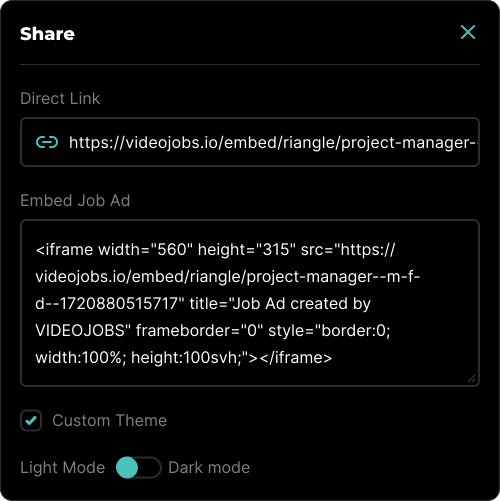
You will see an interface that provides you with sharing options, including an embed code.
### Sharing Options
- **Direct Link:** This option removes the VIDEOJOBS header and footer, allowing the shared link to focus solely on the job ad content.
- **Embed Job Ad:** This provides the code necessary to embed the Job Ad on any website.
- **Custom Theme:** You can enforce a specific theme, either light or dark, to match the design of your website or platform.
Learn more about how you can Embed Open Positions.
Learn more about how you can Embed Video Blocks.